
Search engine results pages (SERPs) have transformed dramatically over the past decade. What once displayed only organic search results now features a variety of SERP elements designed to improve user experience and match intent faster. For digital marketers, freelancers, and SEO learners, understanding each SERP feature is crucial for building an effective SERP SEO strategy.
This guide breaks down the top 10 SERP elements, explains how they impact rankings and visibility, and shows practical tactics for optimising content to appear in them. Whether you’re new to SEO or a seasoned consultant, mastering these Google SERP elements will help you improve click-through rates (CTR), visibility, and overall search performance.
What Are SERP Elements and Why They Matter for SEO
Understanding Search Engine Results Pages (SERPs) forms your foundation for digital marketing success. Every search query generates unique results with different features, layouts, and opportunities. Learning these elements helps beginners optimise content more effectively.
What a SERP Is: Understanding Search Engine Results Pages
A Search Engine Results Page (SERP) is what appears after typing queries into Google, Bing, or other search engines. Traditional results once showed 10 blue links per page, but modern SERPs display varied formats including images, videos, maps, and structured data. Users now experience dynamic, personalised results based on location, search history, and device type.
Google processes over 8.5 billion searches daily (Google, 2024). Each SERP adapts to user intent, showing different elements depending on whether someone seeks information, wants to buy products, or needs local services. Recognising this variety helps you target specific result types for better visibility.
SERPs evolved dramatically since Google launched in 1998. Early pages contained simple text links with meta descriptions. Today, Search Engine Results Pages integrate artificial intelligence, rich media, and interactive features that answer questions without requiring clicks to external sites.
SERP Features vs Traditional Organic Results
Traditional organic results remain blue-link listings ranked by Google algorithms. These appear below paid advertisements and enhanced features, typically starting around position 3 or 4 on mobile devices. Organic listings include title tags, URLs, and meta descriptions that attract clicks through compelling copy.
SERP features occupy premium positions above traditional results. Featured snippets, knowledge panels, and local packs capture attention before users scroll down. Research shows position zero (featured snippets) receives 8.6% of all clicks, while position one organic result gets 26.2% (Ahrefs, 2023).
Competition between features intensifies yearly as Google introduces new formats. Understanding which features appear for target keywords guides your content strategy. Some queries trigger video carousels; others display shopping results or recipe cards. Mapping these patterns reveals opportunities competitors might miss.
How SERP Elements Influence Click-Through Rate (CTR)
Click-Through Rate (CTR) measures how often searchers click your result after seeing it. SERP features significantly impact CTR by occupying visual space and answering queries directly. Pages ranking in featured snippets experience 2 to 3 times higher CTR compared to standard positions (SEMrush, 2023).
Multiple features on one SERP create competition for attention. Users scan results quickly, spending 14.6 seconds on average before clicking (Nielsen Norman Group, 2022). Optimising for SERP features becomes essential for capturing traffic you might lose without enhanced visibility.
Zero-click searches increased from 49% in 2019 to 57% in 2024 (SparkToro, 2024). More queries receive answers directly on SERPs through knowledge panels, calculator features, or instant answers. Adapting your strategy accounts for this shift while maximising opportunities where clicks still occur.
Why Beginners Must Learn SERP Elements First
Learning SERP elements early prevents wasted effort on outdated tactics. Beginners often focus solely on ranking number one organically, overlooking opportunities in image packs, video results, or People Also Ask boxes. Diversifying across multiple features generates consistent traffic regardless of traditional ranking fluctuations.
SERP literacy improves keyword research quality. You spot intent patterns by analysing which features appear for specific queries. Informational searches trigger featured snippets; commercial intent shows shopping results; local queries display map packs. This knowledge shapes content creation from the beginning.
Starting with SERP fundamentals builds strategic thinking. Successful Search Engine Optimisation (SEO) requires understanding how search engines present information to users. Mastering these elements provides competitive advantages as algorithms evolve and new features emerge regularly.
The Top 10 SERP Elements You Need to Know
Modern SERPs contain dozens of potential features, but 10 elements appear most frequently across queries. Mastering these core components equips beginners with practical knowledge for immediate application. Each element serves distinct purposes and requires specific optimisation approaches.
Featured Snippets: Position Zero Explained
A featured snippet is content extracted from a webpage and displayed prominently above organic results. Google pulls text, lists, tables, or images to answer queries directly. This position zero placement drives substantial traffic because users see your content before scrolling to traditional listings.
Three types dominate featured snippets. Paragraph snippets answer “what is” questions with 40 to 60 words of definition. List snippets present steps, rankings, or items in numbered or bulleted format. Table snippets organise comparative data or specifications that users need for decision-making.
Optimising for featured snippets requires strategic formatting. Structure content with clear headings, concise answers, and well-organised lists. Answer questions within 40 to 60 words (approximately 300 characters), then expand with supporting details. Schema markup enhances eligibility by helping Google understand content structure.
Research indicates 12.3% of search queries display featured snippets (Ahrefs, 2023). Pages ranking in positions 1 to 5 have highest capture rates, with position one claiming snippets 30% of the time. You don’t need top rankings to win snippets, pages from positions 6 to 10 sometimes claim position zero by matching query intent perfectly.
Featured snippet optimisation focuses on user intent alignment. Identify question-based keywords in your niche using tools like Answer the Public or Google Search Console. Create dedicated sections answering these questions clearly and comprehensively. Use heading tags properly to signal content hierarchy to search engines.
People Also Ask (PAA): Question-Based Visibility
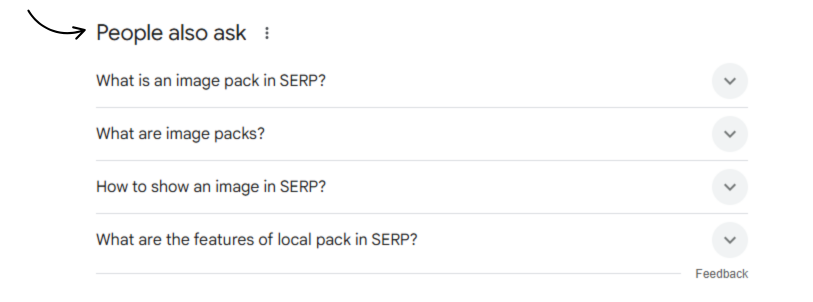
People Also Ask (PAA) is a SERP feature displaying related questions users frequently search. Each question expands to show an answer pulled from relevant webpages, similar to featured snippets. PAA boxes typically contain 2 to 8 questions initially, with more loading as users interact.
PAA provides exponential visibility opportunities. Ranking for one question can lead to appearances in related PAA boxes for dozens of connected queries. This cascade effect multiplies traffic potential beyond individual keyword rankings. Content appearing in multiple PAA boxes establishes topical authority.
Capturing PAA spots requires comprehensive topic coverage. Create content answering primary questions while addressing related sub-questions naturally. Use question headings (H2 or H3 tags) followed by direct, concise answers. Expand answers with context, examples, and supporting information that demonstrates expertise.
PAA questions reveal search intent patterns and content gaps. Analysing these questions uncovers topics your audience cares about that competitors might overlook. Incorporate PAA research into content planning to address user needs comprehensively and increase chances of multiple SERP feature captures.
Google updates PAA questions dynamically based on user behaviour and trending searches. Monitor PAA boxes regularly for target keywords to identify new opportunities. Questions appearing consistently indicate stable demand; new questions signal emerging interests or seasonal trends worth addressing.
Organic Search Results: The Foundation of SEO
Organic search results are unpaid listings ranked by Google algorithms based on relevance, authority, and user experience. These blue-link entries remain fundamental to SEO strategy despite growth in SERP features. Organic results drive 53% of all website traffic (BrightEdge, 2023).
Each organic result contains three key components. Title tags (50 to 60 characters) grab attention with compelling headlines including target keywords. Meta descriptions (150 to 160 characters) provide summaries that convince users to click. URLs display web addresses, preferably short and descriptive for better readability.
Ranking factors for organic results exceed 200 signals according to Google. Core elements include content quality, backlink profiles, page speed, mobile-friendliness, and user engagement metrics. Technical SEO foundations ensure search engines crawl, index, and understand your pages effectively.
Position matters significantly in organic results. The first position receives average CTR of 27.6%, while position 10 receives only 2.4% (Backlinko, 2023). However, CTR varies by query type, SERP features present, and brand recognition. Focus on positions 1 to 5 for meaningful traffic generation.
Optimising organic results combines on-page and off-page strategies. Create high-quality content matching user intent with proper keyword targeting. Build authoritative backlinks from reputable sources. Improve technical performance including Core Web Vitals. Monitor rankings regularly and adjust strategies based on performance data.
Paid Search Ads: How Sponsored Results Appear
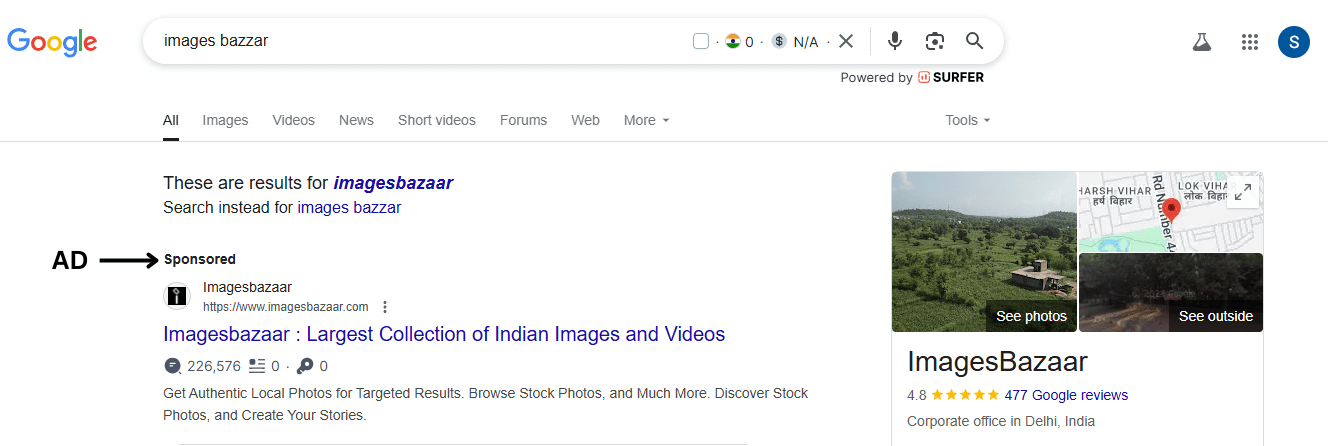
Paid search ads are sponsored listings purchased through Google Ads appearing above or beside organic results. Advertisers bid on keywords, paying per click when users select their advertisements. These ads display “Sponsored” or “Ad” labels distinguishing them from organic listings.
Search ads occupy prime SERP real estate, particularly on mobile devices where ads often fill entire first screens. Commercial and transactional queries trigger more advertisements because businesses compete for buyer attention. Informational queries typically show fewer or no paid results.
Two main ad formats dominate SERPs. Text ads contain headlines, descriptions, and display URLs similar to organic results but with expanded character limits. Shopping ads display product images, prices, and merchant information for e-commerce queries, creating visual carousels above traditional listings.
Ad position depends on Quality Score and bid amounts. Quality Score measures ad relevance, expected CTR, and landing page experience. Higher Quality Scores reduce costs and improve positions even with lower bids. This rewards advertisers creating relevant, user-focused campaigns over those simply spending more.
Understanding paid results helps SEO practitioners recognise competition levels and commercial intent. Keywords with extensive ad coverage indicate high commercial value and strong competition. Analysing competitor ad copy reveals messaging strategies and unique selling propositions worth considering for organic content.
Knowledge Panels and Knowledge Graph Results
A knowledge panel is an information box appearing on the right side of desktop SERPs or top of mobile results. These panels aggregate facts about entities, people, places, organisations, or things, from Google’s Knowledge Graph database. Panels include images, descriptions, key facts, and related searches.
Knowledge panels establish immediate authority and trust. They answer informational queries without requiring clicks, showing Google considers your entity noteworthy and credible. Brands appearing in knowledge panels experience increased recognition and click-through rates on associated organic results.
Google populates panels from authoritative sources including Wikipedia, Wikidata, official websites, and verified business profiles. Claiming your Google Business Profile (for businesses) or optimising Wikipedia entries helps control information displayed. Structured data markup on your website improves chances of inclusion.
Entities covered by knowledge panels include celebrities, companies, landmarks, historical figures, books, movies, and more. Google determines entity worthiness based on search volume, web mentions, and information availability. Building consistent citations across reputable sources strengthens entity recognition.
Knowledge Graph results extend beyond panels to include instant answers, unit conversions, and quick facts. These results appear for queries seeking specific information like heights, ages, definitions, or calculations. Structured data implementation on your site increases eligibility for these enhanced result types.
Visual and Interactive SERP Elements That Drive Attention
Visual elements capture user attention more effectively than text-only results. Images, videos, and interactive features increase engagement and click-through rates substantially. Understanding these visual SERP components helps beginners diversify traffic sources beyond traditional organic listings.
Image Packs: Ranking in Visual Search Results
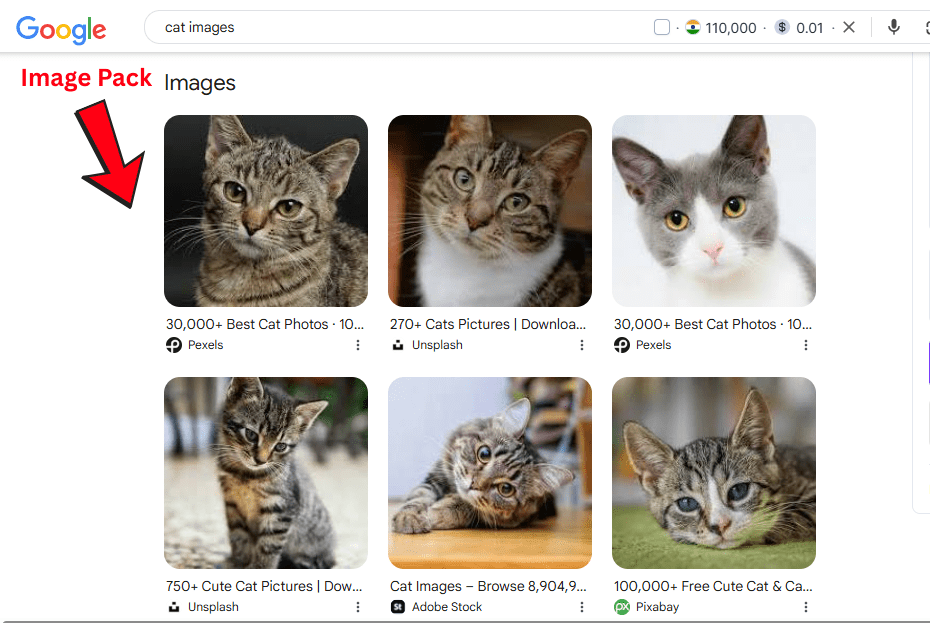
An image pack is a horizontal row of images appearing near the top of SERPs for visually-oriented queries. These packs typically display 3 to 6 images on desktop and 2 to 3 on mobile devices. Clicking images opens Google Images search with expanded results and source links.
Image packs appear for queries with clear visual intent. Searches for products, places, designs, diagrams, or “how-to” instructions frequently trigger image results. E-commerce sites, blogs, and visual content creators benefit significantly from image pack optimisation strategies.
Optimising for image packs requires technical and content considerations. Use high-quality images with proper dimensions (1200 pixels wide minimum recommended). Compress files to reduce loading times without sacrificing quality. Name image files descriptively using target keywords separated by hyphens.
Alt text serves two critical purposes. Screen readers use alt text to describe images for visually impaired users, improving accessibility. Search engines rely on alt text to understand image content since algorithms cannot “see” images directly. Write descriptive alt text (10 to 15 words) incorporating relevant keywords naturally.
Image context matters for rankings. Surround images with relevant text content helping Google understand topical relevance. Use descriptive captions when appropriate. Implement image structured data markup to provide additional information like licensing, subjects, and captions.
Video Results: How YouTube and Video Carousels Rank
Video results are SERP features displaying video content, primarily from YouTube but occasionally from other platforms. These appear as standalone results, carousels, or embedded within knowledge panels. Video thumbnails include titles, channel names, upload dates, and sometimes timestamps for specific sections.
Google prioritises video results for queries indicating video intent. Tutorial searches (“how to fix”), entertainment queries, product reviews, and event coverage commonly trigger video carousels. Understanding when videos appear helps determine whether creating video content suits your strategy.
YouTube optimisation directly impacts SERP video visibility. YouTube functions as the second-largest search engine globally (Google, 2024). Optimising video titles, descriptions, and tags with target keywords improves discoverability. Engaging thumbnails increase click-through rates from both YouTube and Google SERPs.
Video timestamps create chapter markers appearing in search results. These markers allow users to jump directly to relevant sections within videos. Implementing timestamps manually in video descriptions or using YouTube’s auto-chaptering feature enhances user experience and may improve rankings.
Schema markup for video content provides search engines detailed information including descriptions, thumbnails, upload dates, and durations. VideoObject schema increases chances of rich result displays in SERPs. Hosting videos on your own site with proper markup can capture video SERP features independently of YouTube.
Top Stories and News Results in SERPs
Top Stories is a SERP feature displaying recent news articles relevant to queries. This carousel appears prominently for breaking news, current events, or trending topics. Articles typically include headlines, publication names, timestamps, and thumbnail images arranged in horizontal scrolling format.
News results appear within hours of publication, prioritising freshness and relevance. Google News publishers receive preference, but any site producing timely, newsworthy content can appear. Top Stories often display above traditional organic results, commanding significant attention during breaking news cycles.
Qualifying for Top Stories requires Google News approval and adherence to strict content policies. Articles must demonstrate journalistic standards including original reporting, accurate information, and transparent authorship. Technical requirements include proper structured data implementation using Article schema markup.
Three key elements determine Top Stories eligibility. Firstly, content freshness matters; articles published within 24 to 48 hours rank highest. Secondly, topical authority influences inclusion; sites consistently covering specific topics gain preference. Thirdly, user engagement signals including CTR and time on page affect sustained visibility.
Breaking news opportunities create traffic spikes for sites capturing Top Stories positions. Monitoring trending topics in your niche allows quick response with timely, relevant content. Speed and accuracy balance determine success, publishing quickly while maintaining quality standards and factual integrity.
Local Pack Results: Maps, Reviews, and Nearby Searches
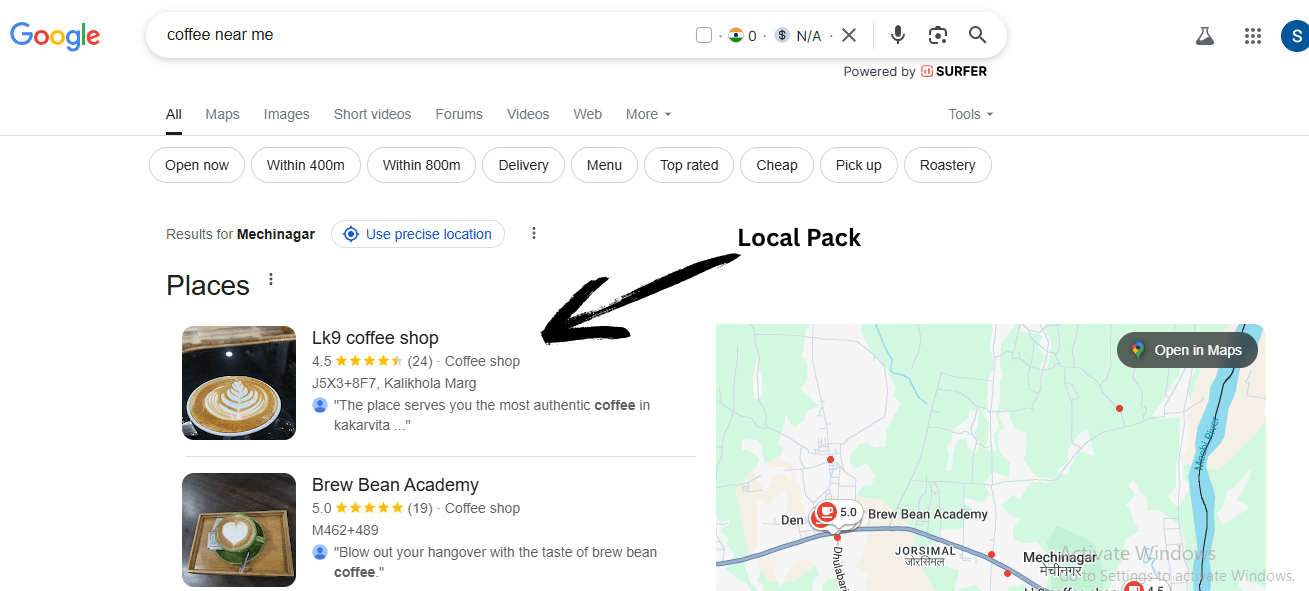
A local pack is a SERP feature displaying businesses relevant to location-based queries. This feature shows 3 businesses with names, addresses, phone numbers, ratings, and map locations. Local packs appear for queries including location terms or for searches Google determines have local intent.
Local packs dominate mobile SERPs where users frequently search for nearby services. Queries like “restaurants near me,” “plumbers in [city],” or “best coffee shop” trigger local pack results. These results drive foot traffic and phone calls, making them crucial for local businesses.
Google Business Profile (GBP) optimisation determines local pack rankings. Claim and verify your business profile, completing all available information fields. Select accurate primary and secondary categories. Add high-quality photos regularly. Respond to reviews promptly and professionally.
Three primary factors influence local pack rankings. Relevance measures how well your business matches search queries. Distance calculates proximity between searcher location and business address. Prominence evaluates overall online authority through reviews, citations, and links.
Reviews significantly impact local pack performance. Quantity, quality, and recency of reviews all matter. Encourage satisfied customers to leave honest reviews on your Google Business Profile. Respond to all reviews, positive and negative, demonstrating engagement and customer care. Five-star ratings improve CTR substantially.
Citations, mentions of your business name, address, and phone number across the web, strengthen local authority. Ensure consistency across directories, social platforms, and your website. Inconsistent information confuses search engines and may harm rankings. Build citations on authoritative local directories and industry-specific platforms.
Conclusion
Mastering the Top 10 SERP Elements transforms your SEO approach from basic keyword targeting to comprehensive visibility optimisation. Modern search results offer diverse opportunities beyond traditional rankings, with featured snippets, People Also Ask boxes, image packs, and video results all driving significant traffic.
Beginners gain competitive advantages by understanding how different SERP features serve distinct user intents. Commercial queries display shopping ads and product listings; informational searches trigger featured snippets and knowledge panels; local queries present map packs with reviews. Recognising these patterns guides content creation and optimisation priorities effectively.
Successful SEO in 2025 requires adaptability as search engines introduce new features regularly. Focus on creating comprehensive, well-structured content that satisfies user needs while implementing technical optimisations like schema markup and proper heading hierarchy. Monitor your target keywords’ SERP layouts to identify opportunities competitors overlook.
Start implementing these SERP element strategies today. Audit your current rankings to identify quick wins in featured snippets or People Also Ask boxes. Optimise images with proper alt text and file names. Claim your Google Business Profile for local visibility. Diversifying across multiple SERP features builds sustainable traffic growth resistant to algorithm fluctuations.
Frequently Asked Questions
What are SERP elements?
SERP elements are various features and result types appearing on Search Engine Results Pages beyond traditional blue links. These include featured snippets, People Also Ask boxes, knowledge panels, image packs, video results, and local packs. Understanding SERP elements helps beginners optimise content for enhanced visibility and increased traffic across multiple result formats.
How many SERP features exist?
Google displays over 20 distinct SERP features, though new formats emerge regularly as search technology evolves. The most common features include organic results, paid ads, featured snippets, People Also Ask, image packs, video carousels, knowledge panels, local packs, shopping results, and Top Stories. Different queries trigger different combinations of features based on user intent.
Can one page rank in multiple SERP elements?
Yes, a single page can appear in multiple SERP features simultaneously. For example, your content might rank in organic results while also capturing featured snippets and appearing in People Also Ask boxes. This multi-feature visibility significantly increases traffic potential and establishes stronger topical authority for your domain.
Do SERP elements reduce organic traffic?
Some studies suggest SERP features increase zero-click searches, where users find answers without clicking any results. However, optimising for features like featured snippets often increases overall visibility and traffic. Adapting strategies to capture multiple SERP elements diversifies traffic sources and compensates for potential losses from traditional rankings.
How do featured snippets differ from knowledge panels?
Featured snippets extract content from specific webpages to answer queries, appearing above organic results. Knowledge panels aggregate information about entities from multiple authoritative sources, typically appearing in side boxes. Featured snippets target informational queries; knowledge panels cover entities like people, places, or organisations with established web presence.
Which SERP elements matter most for local businesses?
Local pack results matter most for local businesses, displaying map locations, contact information, and reviews. Google Business Profile optimisation drives local pack rankings. Additionally, local businesses benefit from organic results, image packs for products or premises, and review-based features that showcase customer satisfaction.
How does mobile SERP layout differ from desktop?
Mobile SERPs prioritise vertical scrolling with features stacking linearly. Paid ads occupy more screen space proportionally. Local packs appear more frequently on mobile searches. Images and videos display in touch-friendly carousels. Desktop SERPs utilise horizontal space better with side panels for knowledge graphs and shopping results.
What is zero-click search?
A zero-click search occurs when users find answers directly on SERPs without clicking through to websites. Features causing zero-click searches include knowledge panels, instant answers, calculators, and comprehensive featured snippets. while reducing traditional traffic, ranking in these features still provides brand visibility and authority signals.
How often do SERP features change?
SERP features evolve continuously as Google tests new formats and refines existing ones. Major updates occur several times yearly, introducing new features or modifying existing displays. Individual SERPs change based on personalisation, location, device type, and search history. Regular monitoring ensures your strategy adapts to current SERP landscapes.
Should beginners focus on SERP features or organic rankings?
Beginners should pursue both strategies simultaneously. Traditional organic rankings remain foundational for consistent traffic. However, optimising for SERP features accelerates visibility and captures additional traffic channels. Balancing these approaches creates resilient SEO strategies that perform well regardless of algorithm changes or SERP evolution.